Why do mountains look smaller in photos?
Short answer
Because the phone's main camera is a wide-angle lens. It squeezes a view about 70 degrees wide onto a screen that fills roughly 17 degrees of your vision at arm's length, so everything in the photo is shown at about a fifth of the size you saw. A distant mountain takes up a small part of that view to begin with, so it's the thing you notice shrinking. A 4x or 5x telephoto puts it back near life size.
 Standing in front of one now? Mountain Identifier: Peaks labels the peaks in your camera view →
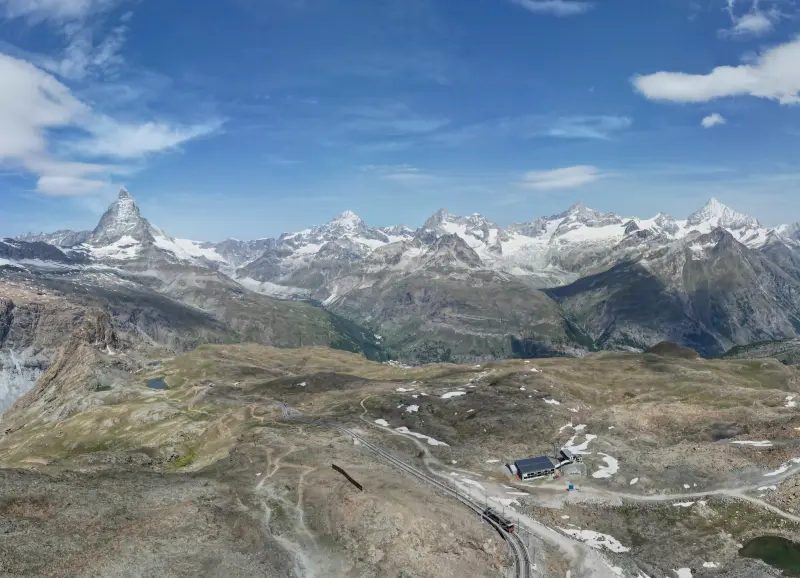
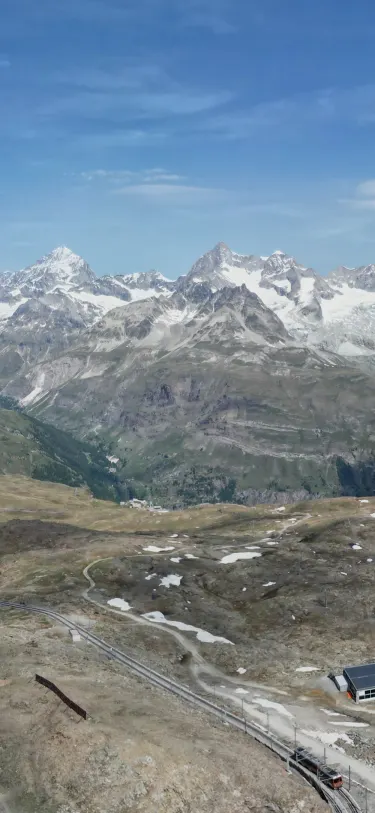 Dent Blanche4,358 m · 14.5 kmOber Gabelhorn4,073 m · 10.9 km9:41Dent Blanche4,358 m · 14.5 km away

The short version: the photo is smaller than the view
A mountain doesn't shrink in a photo because the camera sees it differently. It shrinks because of how big the photo is when you look at it.
The iPhone's 1x camera is a wide-angle lens. On the iPhone 17 it's 26 mm, and the ultra wide is 13 mm with a 120° field of view (Apple quotes these as 35 mm-film equivalents). A 26 mm lens takes in a scene about 67° wide. Then you look at that picture on a screen about 89 mm / 3.5 in wide, held a foot or so from your face, where it fills about 17° of your vision.
So a 67° view is shown in 17°. Everything in it is drawn at roughly a fifth of the size you saw. You don't notice with the trail at your feet, because it still fills the bottom of the frame. You notice with the mountain, because it was a small slice of the view to start with and now it's a smaller one.
How much smaller, lens by lens
Take a ridge rising 3,300 ft / 1,000 m above you, 6 miles / 10 km away. It stands about 5.7° tall in your view. Here's how tall it ends up on an iPhone 17's screen (2,622 × 1,206 pixels at 460 ppi) with the photo turned sideways to fill it, held 30 cm (about a foot) away:
| Camera button | Focal length | Ridge on screen | Size vs. what you saw | Life size if held at |
|---|---|---|---|---|
| 0.5x ultra wide | 13 mm | 3.3 mm | 11% | 3 cm |
| 1x (iPhone 17) | 26 mm | 6.7 mm | 22% | 7 cm |
| 2x | 52 mm | 13 mm | 45% | 13 cm |
| 4x (iPhone 18 Pro) | 100 mm | 26 mm | 86% | 26 cm |
| 5x (iPhone 16 Pro) | 120 mm | 31 mm | 103% | 31 cm |
| 8x (iPhone 18 Pro) | 200 mm | 51 mm | 170% | 51 cm |
Focal lengths are from Apple's spec pages for the iPhone 17, iPhone 18 Pro and iPhone 16 Pro. We worked out the rest ourselves, assuming a 4:3 photo filling the screen's height and a mountain near the middle of the frame. Your phone and your grip will shift the numbers a little. They won't change the pattern.
The last column is the useful one. A photo looks true to life when you hold it at the distance that makes it fill the same angle the lens did. Wikipedia's article on the normal lens makes the same point: you can see a scene shot with any lens in normal perspective if you adjust the viewing distance.
For a 1x shot on a phone, that distance is about 7 cm, closer than most adults can focus. For the 4x or 5x lens, it's about the distance you already hold your phone.
Why it looked bigger in person
Standing there, you had more than an angle to go on. You had both eyes, the ground running away from you, the haze on the farther ridges, the time it took to drive in. Your brain uses all of that to judge how far away the mountain is, and so how big it must be. A flat picture keeps few of those cues, and the haze it does keep mostly makes the far ridges look fainter. That's why distant mountains look blue and flat in photos too.
The Moon shows the gap between what's there and what you perceive. NASA's explainer on the Moon illusion says it's "all in your head": photos prove the Moon is the same width near the horizon as high in the sky. The page also says the huge-Moon pictures are made by zooming in on distant objects near the ground. That's the fix for mountains too.
How to make a mountain look as big as it felt
- Leave 1x and 0.5x for the foreground. If the peak is the subject, tap 2x, then 4x or 5x if your phone has it. On an iPhone 17, 2x is the longest lens Apple calls optical quality. Past that, it's digital zoom up to 10x, which is cropping, so detail falls off.
- Crop out the empty bits. Most of a 1x mountain photo is sky and the ground at your feet. Cropping after the fact does the same thing as digital zoom, but it's better than leaving the peak as a strip across the middle.
- Put something of known size in front. A person on the trail, a car, a cabin or a line of trees tells the viewer how big the mountain is. Without one, a big peak and a small hill can look alike.
- Shoot from lower down. On a summit you're level with the other peaks, so nothing towers. Tim Parkin, writing in On Landscape, argues that some of the best mountain images come from comparatively modest altitudes, where the mountain still rises above you.
- Pick clear air. Haze cuts contrast and makes ridges read as far and faint. Air freshly cleared by a front keeps the most contrast, and our guide to why you can't see the mountains some days covers what's in the air the rest of the time.
Then work out which peak you shot
A tight telephoto frame of one summit is often harder to name later than a wide one, because the landmarks around it are gone. The photo's location tag plus the direction you faced is the reliable way in. Our guide to identifying a mountain from a photo walks through matching the skyline on a 3D map.
Mountain Identifier: Peaks can also suggest a name. Its photo identification sends the picture to an AI vision model with a place hint from the photo's GPS tag, and returns a peak name with a confidence score. That's an AI suggestion, not a skyline match, so check it on a map. It needs a connection and is part of the Pro subscription.
If you'd rather know the names before you press the shutter, the live view, also part of Pro, labels the peaks in the camera view within 80 km (about 50 miles). It's covered in what mountains you can see from here.
Frequently asked questions
What focal length matches the human eye?
There's no single answer. A lens is called normal when its focal length is close to the frame's diagonal: about 43 mm on full-frame, with 50 mm the usual choice. On a phone, viewing distance matters more. At about a foot away, a 100 to 120 mm equivalent lens shows distant things near the size you saw them.
Should I use 0.5x or telephoto for mountains?
Telephoto, if the mountain is the subject. The 0.5x ultra wide shows distant peaks at about a tenth of life size on a phone held a foot away. Use 0.5x when the foreground is the subject: a trail, a lake, a tent, with the mountain as backdrop.
How do you make mountains look bigger in photos?
Zoom in with the 2x, 4x or 5x lens instead of shooting at 1x, crop out the empty sky and near ground, include something of known size such as a person or a cabin, and shoot from lower down so the peak rises above you rather than sitting level with you.
Does zooming in make the mountain look closer?
It makes it bigger in the frame. It also shows nearer and farther ridges at a similar size, so the layers look stacked together. Photographers call that compression. It comes from where you stand, not the lens, but a long lens is what lets you frame it.
Why does the Moon look tiny in my photos too?
The same reason. The Moon spans about half a degree of sky, and a wide phone lens shrinks that further. NASA notes that the huge-Moon photos you see are made by zooming in on distant objects near the ground with a long lens.
Next time, point your phone at it.
Name, elevation and distance for the peaks in your camera view. Free to download; identification is part of Pro.
 Dent Blanche4,358 m · 14.5 kmOber Gabelhorn4,073 m · 10.9 km9:41
Last reviewed Nov 25, 2026. Peak data © OpenStreetMap contributors (ODbL).